> ## Documentation Index
> Fetch the complete documentation index at: https://docs.betterfloat.com/llms.txt
> Use this file to discover all available pages before exploring further.
# General Features
> Overview of the basic features
## Auto-Refresh
Available for CSFloat. Also available for DMarket & Lisskins on the pro plan.
Please use this feature responsibly. Refreshing more than once every 30s **CAN** get you banned over longer periods of time.
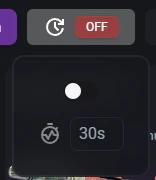
This feature is specific to the "NEWEST"-sorting on CSFloat. It automatically refreshes the page in a certain interval to show the newest listings. This can be useful to quickly identify new listings and potentially good deals.
You can select between the following intervals:
* 20 seconds (PRO plan only)
* 30 seconds
* 1 minute
* 2 minutes
* 5 minutes
Please be aware of CSFloat's strict rate limits. BetterFloat is not reponsible for any bans or restrictions due to excessive requests.
 ## Sticker Prices
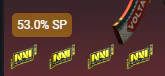
This feature adds a sticker price indicator to the listing. It's a very common metric in trading and can be useful to quickly identify the overpay for the stickers on an item.
For non-mathematicians: The sticker price (%SP) is the percentage of the un-applied sticker value incorporated into the price.
### How is it calculated?
$SP = \dfrac{p_r - p_b}{\sum_{i=1}^{|s|} p_{s_i}}$
Where:
* $SP$ is the displayed sticker price in %
* $p_r$ is the price of the listing
* $p_b$ is the base price of the item (for example the Buff price)
* $|s|$ is the number of stickers on the item
* $p_{s_i}$ is the base price of sticker $i$
## Sticker Prices
This feature adds a sticker price indicator to the listing. It's a very common metric in trading and can be useful to quickly identify the overpay for the stickers on an item.
For non-mathematicians: The sticker price (%SP) is the percentage of the un-applied sticker value incorporated into the price.
### How is it calculated?
$SP = \dfrac{p_r - p_b}{\sum_{i=1}^{|s|} p_{s_i}}$
Where:
* $SP$ is the displayed sticker price in %
* $p_r$ is the price of the listing
* $p_b$ is the base price of the item (for example the Buff price)
* $|s|$ is the number of stickers on the item
* $p_{s_i}$ is the base price of sticker $i$
 ## CSBlueGem Integration
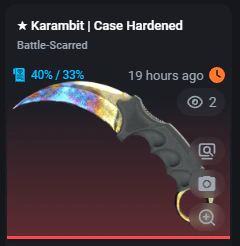
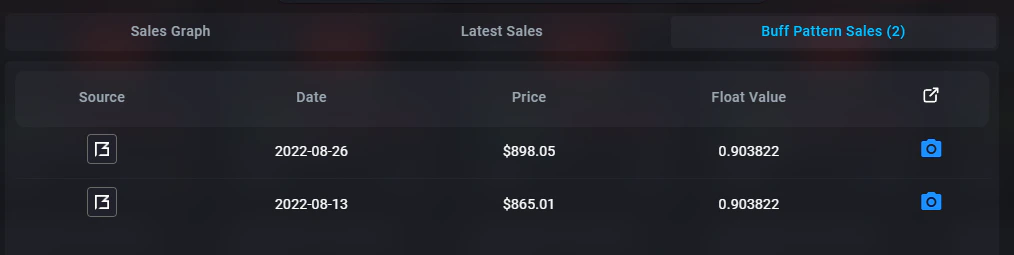
CSBlueGem is a third-party service that provides a detailed case hardened analysis and data. BetterFloat integrates this data into the extension to provide a more details for individual patterns via their blue percentage and most recent sales. You can visit their website here: [https://csbluegem.com/](https://csbluegem.com/).
The blue% indicator used the format playside/backside to display the amount of blue. Most patterns do no go up to 100%.
## CSBlueGem Integration
CSBlueGem is a third-party service that provides a detailed case hardened analysis and data. BetterFloat integrates this data into the extension to provide a more details for individual patterns via their blue percentage and most recent sales. You can visit their website here: [https://csbluegem.com/](https://csbluegem.com/).
The blue% indicator used the format playside/backside to display the amount of blue. Most patterns do no go up to 100%.