> ## Documentation Index
> Fetch the complete documentation index at: https://docs.betterfloat.com/llms.txt
> Use this file to discover all available pages before exploring further.
# Listings
> Convenience features and options for listings
### Show In-Game Pictures
Only available for CSFloat.
If enabled, the extension will replace the default skin image with in-game pictures for the listing. This can be especially useful for pattern-based items or items with applied stickers.
It is turned off per default and always-on for item popups.
This features uses a lot of additional bandwith and memory. If your site loads slowly, keep this option turned off.
 ### Show Listing Age
Only available for CSFloat.
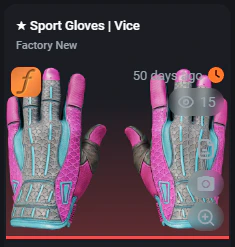
If enabled, the extension shows the age of the listing in hours / days. This can be useful to identify listings that have been on the market for a long time and might lack demand.
This information is exclusive to this extension setting and not available on the site otherwise.
### Low / High Float Coloring
Colors the float of an item if it is below or above a certain threshold. This can be useful to quickly identify items with a specific float value. The used colors are:
| Color | Description |
| ----------- | ------------------------------------------------- |
| turquoise | Good float, often worth decent overpay |
| indianred | Bad float, often deminishes possible overpays |
| springgreen | Very good float, often worth a lot of overpay |
| orangered | Very bad float, often also worth a lot of overpay |
### Show Minimum Bargain Price
Only available for CSFloat.
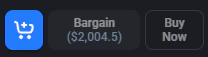
If enabled, the extension displays the minimum possible bargain limit for the item in the bargain button. This can be useful to quickly identify if bargaining is worth it for a specific item.
### Show Listing Age
Only available for CSFloat.
If enabled, the extension shows the age of the listing in hours / days. This can be useful to identify listings that have been on the market for a long time and might lack demand.
This information is exclusive to this extension setting and not available on the site otherwise.
### Low / High Float Coloring
Colors the float of an item if it is below or above a certain threshold. This can be useful to quickly identify items with a specific float value. The used colors are:
| Color | Description |
| ----------- | ------------------------------------------------- |
| turquoise | Good float, often worth decent overpay |
| indianred | Bad float, often deminishes possible overpays |
| springgreen | Very good float, often worth a lot of overpay |
| orangered | Very bad float, often also worth a lot of overpay |
### Show Minimum Bargain Price
Only available for CSFloat.
If enabled, the extension displays the minimum possible bargain limit for the item in the bargain button. This can be useful to quickly identify if bargaining is worth it for a specific item.
 ### Remove Preview Clustering
Only available for CSFloat.
When enabled, this removes irrelevant data such as the seller's online status or the 'key'-symbol. Generally leads to a cleaner experience for experienced users and smaller item cards / displays. Default: off.
### Remove Preview Clustering
Only available for CSFloat.
When enabled, this removes irrelevant data such as the seller's online status or the 'key'-symbol. Generally leads to a cleaner experience for experienced users and smaller item cards / displays. Default: off.